In GWADW, we value the poster contributions highly and make a strong effort to help the participants find posters that are in their areas of interest.
To do this, two poster sparklling session are foreseen on Tuesday and Thursday afternoon before the two poster sessions, with 1 minute and 1 slide for each poster presenter. All posters will be available for the full duration of the workshop.
Poster Instructions
Posters will be displayed in electronic form only through dedicated screens, whereas traditional printed versions will not be accepted.
Required material
- One slide for the poster sparkling session in .pdf format
- An electronic copy of their poster in .pdf format;
- A close-up picture of the presenter to be used for the poster display;
All files should be uploaded on indico by Thursday, May 14, 2026.
Naming scheme
Please use the following naming scheme:
SParkling session slide: SP_<session>_<abstract ID>.pdf (must be a pdf and not exceed 1 M in size)
PDF version of Poster: PO_<session>_<abstract ID>.pdf
A Close-up Picture of the poster presenter : CP_<session>_<abstract ID>.pdf
Poster size and graphics
The posters will be displayed on 50-inch screens, with an overall active area of 61.6 x 109.5 cm, and a resolution of 3840 x 2160 pixels, with a portrait orientation. The suggested size of the posters is that of the ISO 216 A1 standard: 59.4 x 84.1 cm, with an aspect ratio of 1:1.414.
The close-up picture of the presenter will be automatically included in the graphical display by the system, and there is no need for the authors to manually insert it in the layout of the poster. The same holds for any additional information related to the conference. The final display will include a QR code redirecting to the pdf file of the poster.
Note that the electronic version of the poster provided by the author will be converted to a raster image for the purpose of the display on the conference screens, and presenters should avoid using exceedingly small graphical elements of any type and/or low-resolution plots and images.
Uploading your material
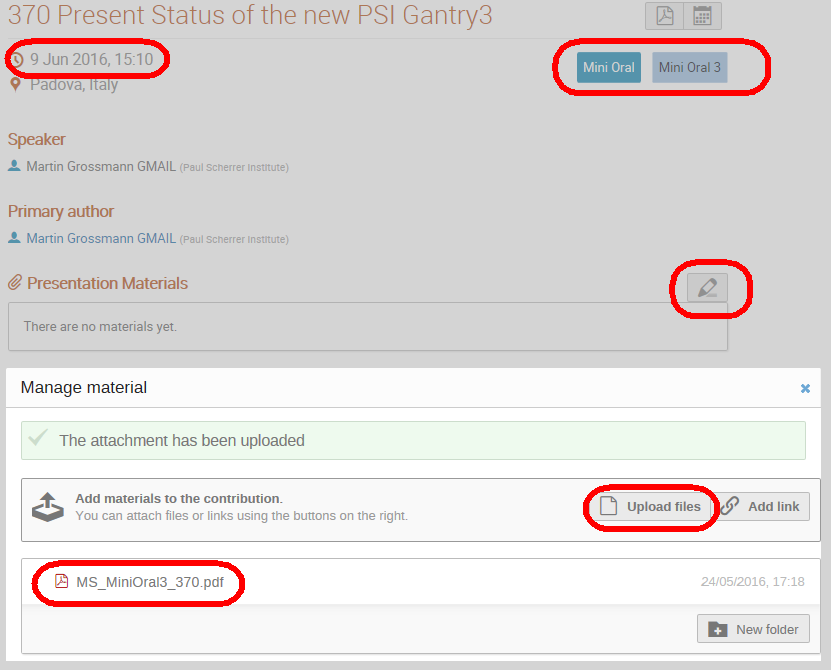
When you go to "My Contributions" you will see 2 entries for your poster: the poster itself plus an additional entry for the slide. The slide is identified by having the abstract_ID in the title:

Clicking on the entry will show you for which session you are scheduled. Upload the poster and the closeup picture to the Poster session:

and the mini-oral presentation to the Mini Oral session